
Run an interview
Use the conductor to move through planned questions and gather evidence relevant to the job’s Cipher.
Who can do this
These people can open the conductor and start the interview:
- the interviewer named on the interview
- the Hiring Manager or the TA Partner of the job
- an Admin or a Super Admin
Other members of the job team cannot start an interview that is not theirs.
Before you begin
Complete the briefing, confirm any required recording consent and check your microphone. For an online interview, join the meeting. If no meeting link was scheduled, have the link ready.
Conduct the interview
-
Open the conductor and confirm the candidate, job and interview shown.
-
Open each of the five tabs: Detail, Cipher, Resume, Template and Briefing. The Template tab lists the planned questions, with the tags and the What to listen for note of each question. Until you open all five tabs, the button says how many tabs you still have to review. Then select Confirm & Start Interview.
-
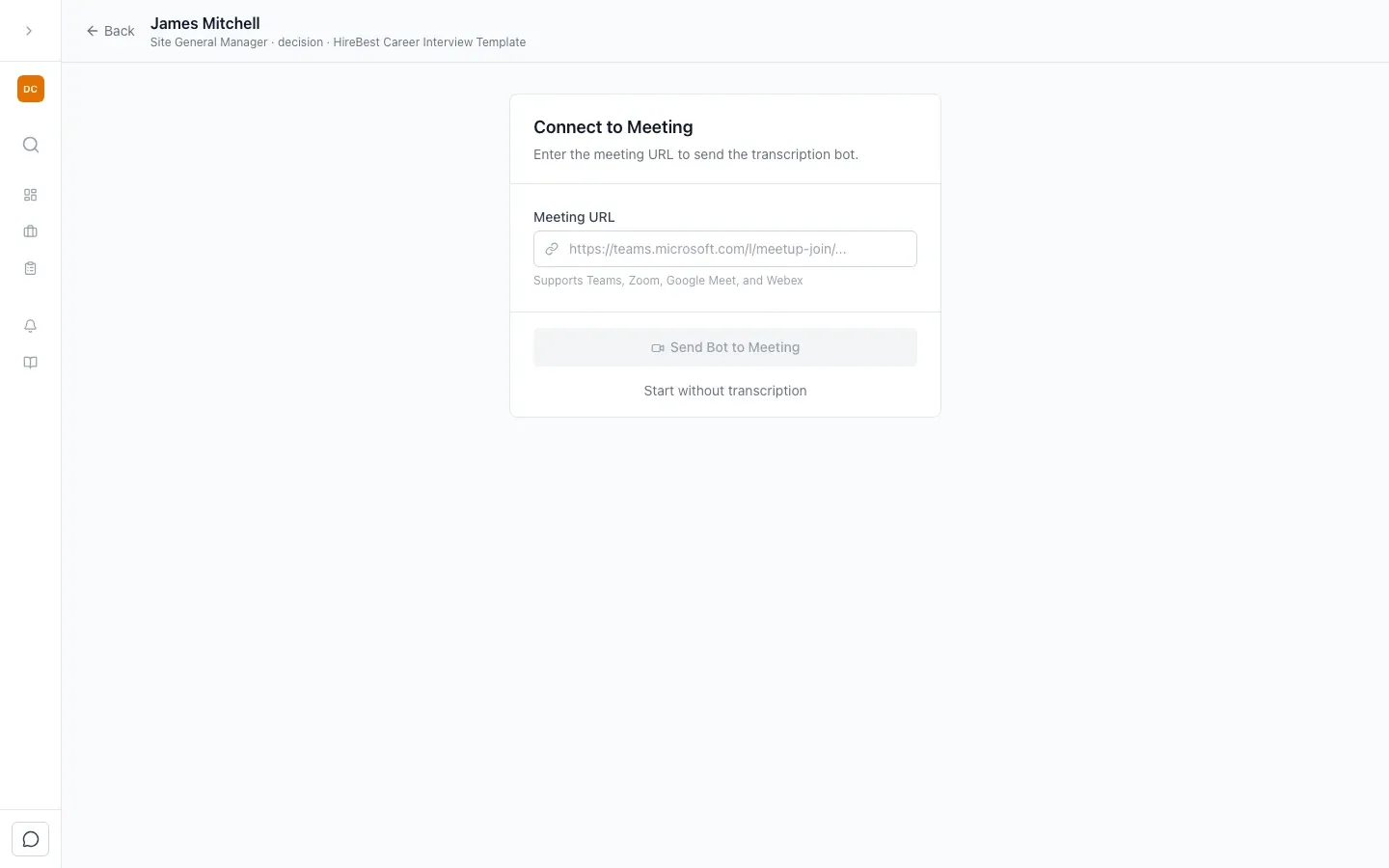
In Connect to Meeting, check the Meeting URL. If the scheduler added a meeting link, HireBest fills in the box and shows "From the schedule" under it. You can change the link. If the box is empty, paste the Teams, Zoom, Google Meet or Webex link.
-
Click Send Bot to Meeting, then admit the note-taker bot from the meeting lobby. The bot joins only when you click this button. To run the interview without a recording, click Start without transcription.
-
Start the interview only when the conversation is ready to begin. Send Bot to Meeting and Start without transcription start the interview. If an interview still shows as scheduled while you work in the conductor, your first question or note starts it. When the interview starts, its guide is locked: nobody can change its questions after that.
-
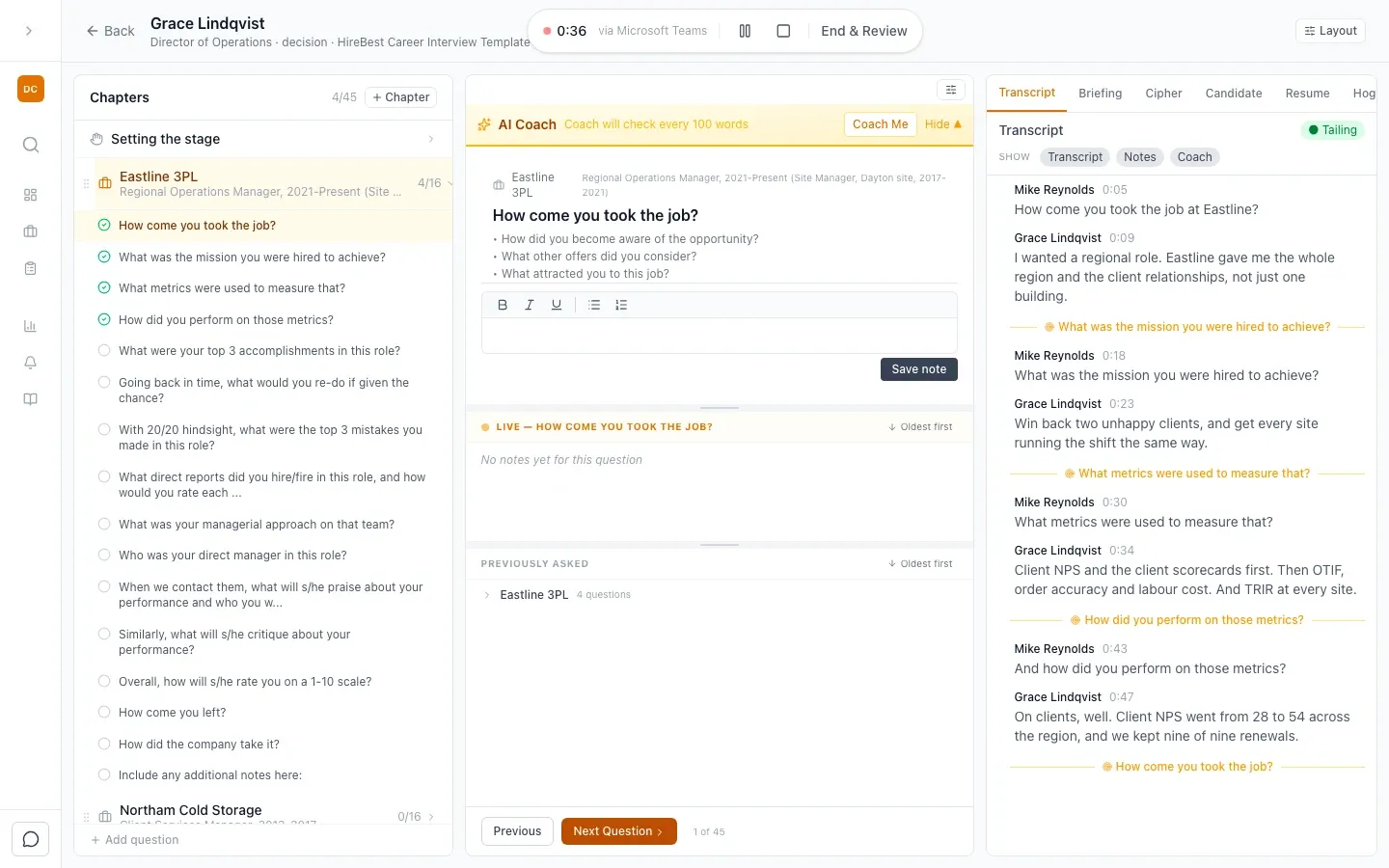
Work through the active question, listening for evidence and using appropriate follow-ups. Under the question you see its follow-up prompts, its tags and the interviewer note (What to listen for) from the interview guide. A long note shows two lines; click Show more to read all of it. Only interviewers see these.
-
Move through the plan without treating the question list as a script. Keep the experience conversational and fair.
Keep to the time plan
When the interview was scheduled, the scheduler can set the minutes for each chapter. HireBest then shows your pace:
- Under each chapter name, the chapter list shows the minutes used against the minutes planned, for example "12 / 15 min". The text turns amber when the chapter runs over its plan.
- A chapter planned at 0 minutes shows "Listed, not scheduled". Its time counts against the plan.
- Beside the recording timer, HireBest shows On pace, or the minutes you are behind, for example "8 min behind". It shows "behind" from 2 minutes.
The time starts when you select the first question. Time counts toward the chapter of the question that you selected last. If you skip a chapter, you get its time back. A chapter with no planned minutes shows no pace.
If the recorder leaves the call
If the note-taker bot leaves the call and nobody selected Stop recording in HireBest, HireBest asks: "The recorder left the call. Has the interview ended?" This happens when the meeting ends, or when someone in the meeting removes the note-taker.
- Select Yes, end the interview to end the interview and go to review. This does the same as End & Review.
- Select No, keep going to continue the interview. HireBest transcribes nothing more, and the bar shows "No transcription". Your notes still save. To send the bot back to the call, select Add bot to call.
Run a quick interview without a job
A quick interview starts a recorded, transcribed interview from a name only. It needs no job, no Cipher and no schedule. Every member of the organization can start one.
- On the dashboard, click Quick interview.
- Enter the Candidate name. The email is optional. Click Start interview.
- If the person may already be in your organization, HireBest shows the match. Click the existing person, or click Create a new person named with the name you typed.
- HireBest opens the conductor. Run the interview as the steps above say.
In the HireBest mobile app, tap + Quick interview, enter the Candidate name, then tap Start interview. The phone must be online to start a quick interview.
Until you add a quick interview to a job, it waits under Parked quick interviews on the dashboard. You see your own quick interviews there. Admins and Super Admins see all of the quick interviews in the organization. A parked interview has no Cipher, so nobody can rate it. Add it to a job with a Cipher to rate it and to get the analysis against that Cipher.
To move a parked interview into a job:
- In Parked quick interviews, click Add to a job on the interview.
- Pick the job. HireBest makes a normal application on that job, with the interview attached, and opens the application. The interview keeps its own chapters. They do not change to the job's interview rounds.
Only the hiring manager or the TA partner of the job, or an Admin or a Super Admin, can add a quick interview to that job. The list shows only the jobs that you can use. If you cannot use any job, HireBest shows "Only the job's hiring manager, its TA partner or an admin can add this to a job." If HireBest refuses the move, it shows "You cannot add this interview to that job. The job's hiring manager, its TA partner or an admin can add it."
What happens next
Finish the interview in HireBest so its notes, transcript and analysis can move into the review workflow.
Common problems
- The conductor cannot start: confirm that you are the interviewer named on the interview, the Hiring Manager or the TA Partner of the job, or an Admin.
- "This interview is already completed or cancelled." shows: you cannot start this interview again. Schedule a new interview if the candidate needs one.
- Send Bot to Meeting is not available: the Meeting URL box is empty. Paste the meeting link.
- The scheduled meeting link is wrong: change it in the Meeting URL box before you send the bot. To correct it for later, edit the scheduled interview.
- A question is not suitable: use professional judgment, stay within the interview purpose and record relevant evidence.
- Recording is not permitted: follow your organization’s process and do not record without the required consent.