
Finish an interview
Complete the interview in HireBest after the conversation ends so its evidence can move into review.
Who can do this
The assigned interviewer can complete the interview they conducted.
Before you begin
End the live conversation, check that any essential notes are present and confirm that recording or transcription has stopped as required.
Complete the interview
-
Review the conductor for any unfinished required step.
-
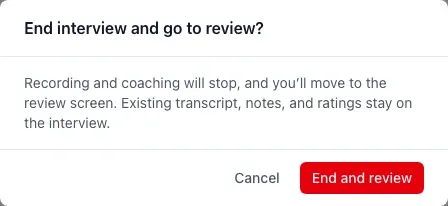
Select End & Review and check the confirmation before continuing.
-
Select End and review when prompted, then wait for HireBest to open the review flow.
What happens next
Post-interview processing may take time. When the review is ready, use the transcript, analysis and your own evidence to complete the required rating.
Always select End & Review when the conversation ends. An interview that started and was not ended stays in progress. After its end time, Insights shows it as an incomplete interview. See Read Insights.
If the note-taker bot leaves the call first, HireBest asks: "The recorder left the call. Has the interview ended?" Select Yes, end the interview to end the interview and go to review. See Run an interview.
Common problems
- "A note is not saved. Your text is kept." shows, and the interview does not end: HireBest does not end the interview while a note is not saved. Select Retry. If the save keeps failing, select Discard and continue. HireBest shows the note text so that you can copy it first. Then end the interview again.
- Processing is still underway: leave the interview completed and return after the status changes; do not start a duplicate.
- You completed the wrong interview: contact the job owner or support rather than creating replacement evidence silently.