
Read the available assessment results
When processing finishes, HireBest makes the result material available from the application.
Open the results
-
Open the candidate application and its Assessments tab.
-
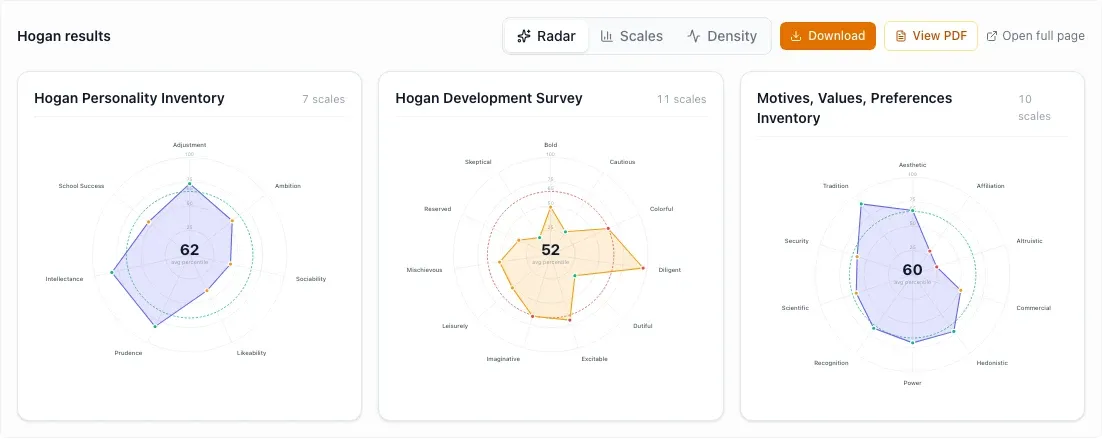
Confirm the status is Ready. The results show on the tab.
-
Select Radar, Scales or Density to change the chart.
-
Select View PDF to read the full report on the tab. Select Hide PDF to close it. Select Download to save the PDF.
-
To open the results on a page of their own, select Open full page.
-
If the application has more than one report, select the report in the list next to Hogan results. The newest report shows first.
-
Use only reports your role permits you to access.
-
Combine assessment information with job-relevant interview and work-history evidence. Follow your organization’s qualified interpretation and decision process.
Problems and recovery
- The results do not show: the status is not Ready yet. See Order and monitor an assessment.
- "You cannot see the results of this report.": you do not have access to this report. Ask the hiring manager or an admin of the job.
- "The report PDF is not available for this assessment.": this assessment has no PDF. The sample assessments in a demo organization have no PDF. The charts still show.