
Manage email preferences
Control optional activity emails without changing the in-product notification record.
Change preferences
-
Open Account, then Email Preferences.
-
Find the notification type. The types are grouped: Interviews, Candidates, Cipher, Decisions, Compliance, Team and System. Who receives this shows who gets each type.
-
Turn the Email switch on or off for that type. The change applies only to your own emails.
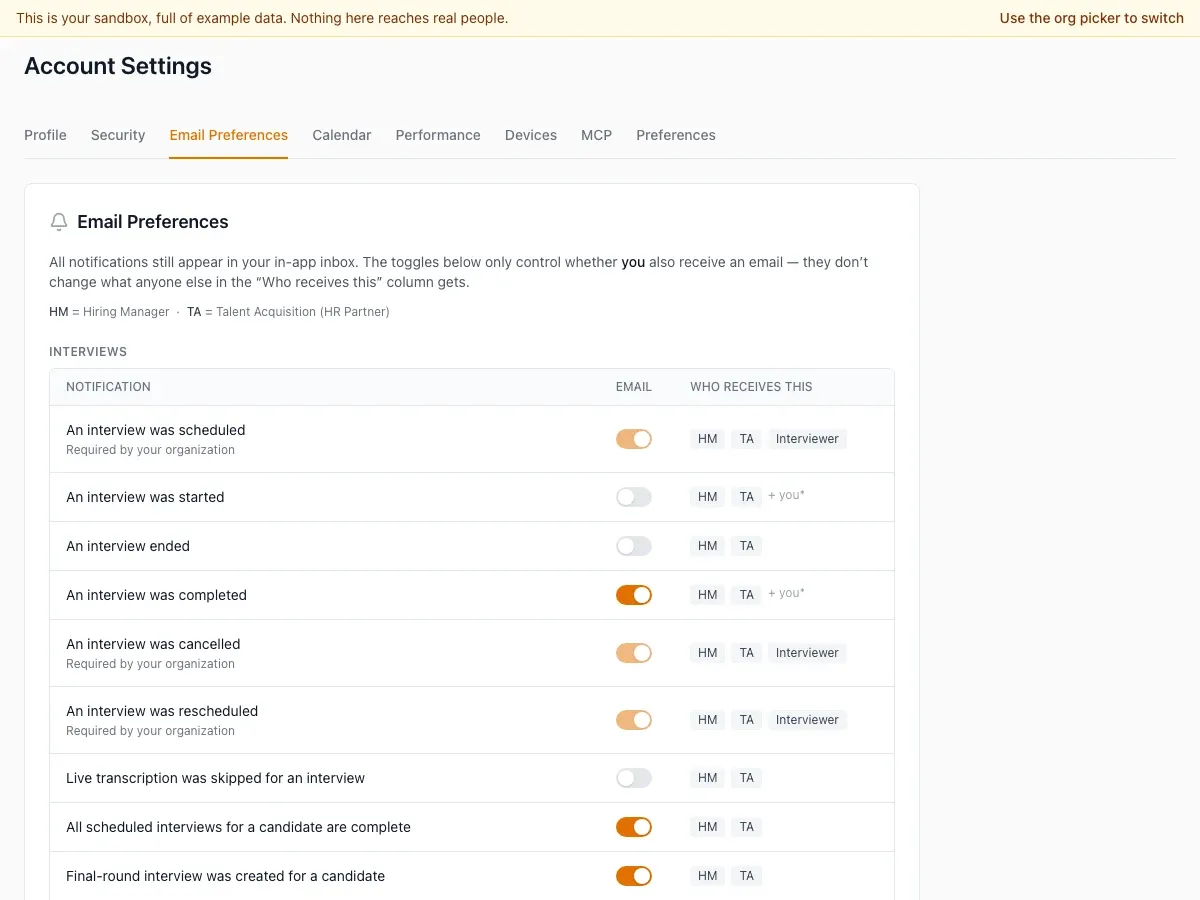
All notifications still show in HireBest. A type that your organization turned off for everyone is not in the list.
Someone mentioned you in a comment or note is in the Team group. It has a Recommended badge and a How mentions work link. If you turn it off, you get no email when a colleague mentions you, but the mention still shows in your notifications. See Mention a colleague.
Invitations and password reset emails are not in this list. They always go out.
A type that your organization made required shows as on and greyed out, with the words "Required by your organization". It is always emailed to you, and you cannot turn it off. Ask an Admin if you think it should not be required.
Changing email preferences does not remove notifications already shown in HireBest.